
Why WhatsApp photos print soft, and what our AI can and cannot fix
A chat copy has a few hundred pixels; a 30 cm page wants thousands. What our AI does to soft photos before print, what it cannot, and why the original wins.
Most family books have a few of them: the photo a sister sent to the group, the one saved from a friend's story, a picture from a phone that was new ten years ago. On a phone they look like any other photo. Printed across a 30 cm page they go soft. Every printed MakeAlbum book now has those photos improved by our AI before it prints, free. This article explains why the copies print soft, what our AI does to them, what it cannot do, and why the original file is still the best fix.
What a chat app does to a photo
A phone camera makes a photo around 4,000 pixels across. A chat app shrinks it before sending: WhatsApp's standard quality takes it to about 1,600 pixels on the long side, compresses it again and strips out the date and place it was taken. A copy of a copy, forwarded on, saved from a story or screenshotted, loses more each time, and a file a few hundred pixels wide is not unusual. Messenger, Instagram messages and most other chat apps do much the same.
A screen hides the loss. A phone shows a photo a few centimetres wide, and a few hundred pixels are enough to fill that. The copy below is 400 pixels across, and on a phone it looks like the photo.
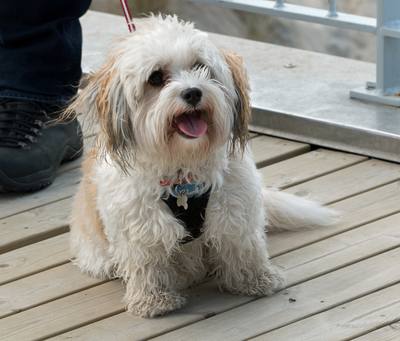
Paper does not hide it. A MakeAlbum page is 30 cm square. To look sharp across that width at the distance you hold a book, a photo needs roughly 1,800 pixels, and about 3,500 to hold up under a close look. Stretched over a full page, the 400-pixel copy has about 34 pixels per inch: each pixel of the file becomes a square three quarters of a millimetre wide, and the eyes, the fur and every edge go soft.
What our AI does
When a photo would print soft at its place on the page, our AI enlarges it for print with a model trained for this one job: rebuilding edges and texture from a small, compressed file. The outline of an ear, the strands of fur and the grain of a wooden deck come out sharper than the same file enlarged the ordinary way. Outside the faces, part of that ordinary enlargement is kept in the mix, so the result stays close to the photo rather than to the model's idea of it.
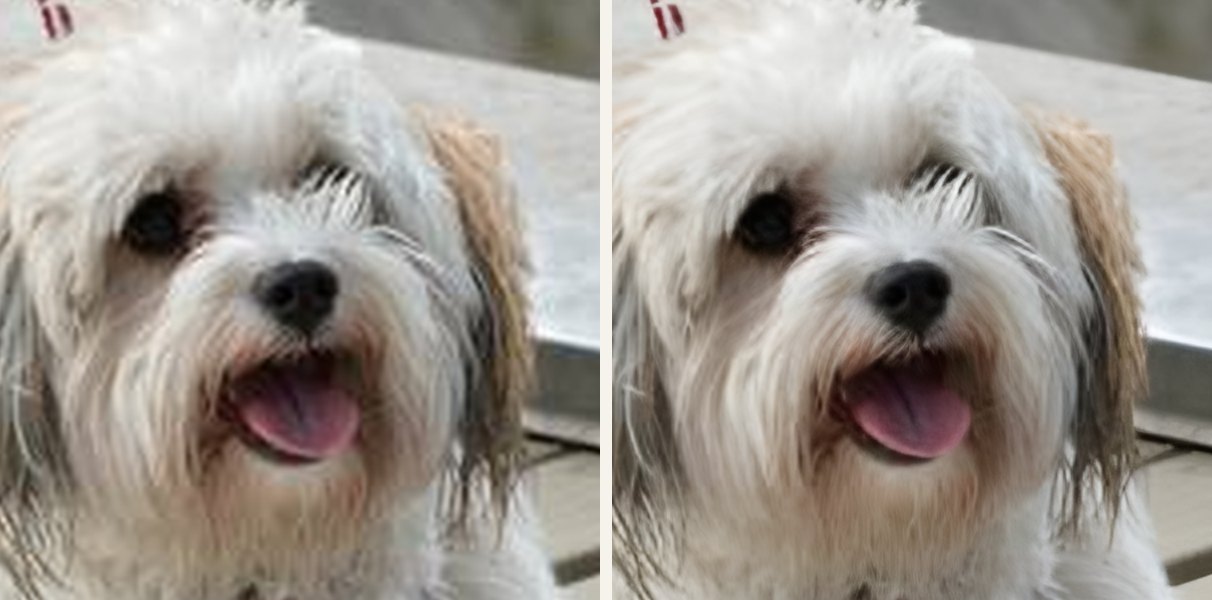
It is free with every printed book, and it runs on our own servers: your photos are not sent to anyone else for it. You see each improved photo before and after, and can print the original instead. A person at MakeAlbum also looks through every paid book before it goes to the printer, the improved photos included.
What it cannot do
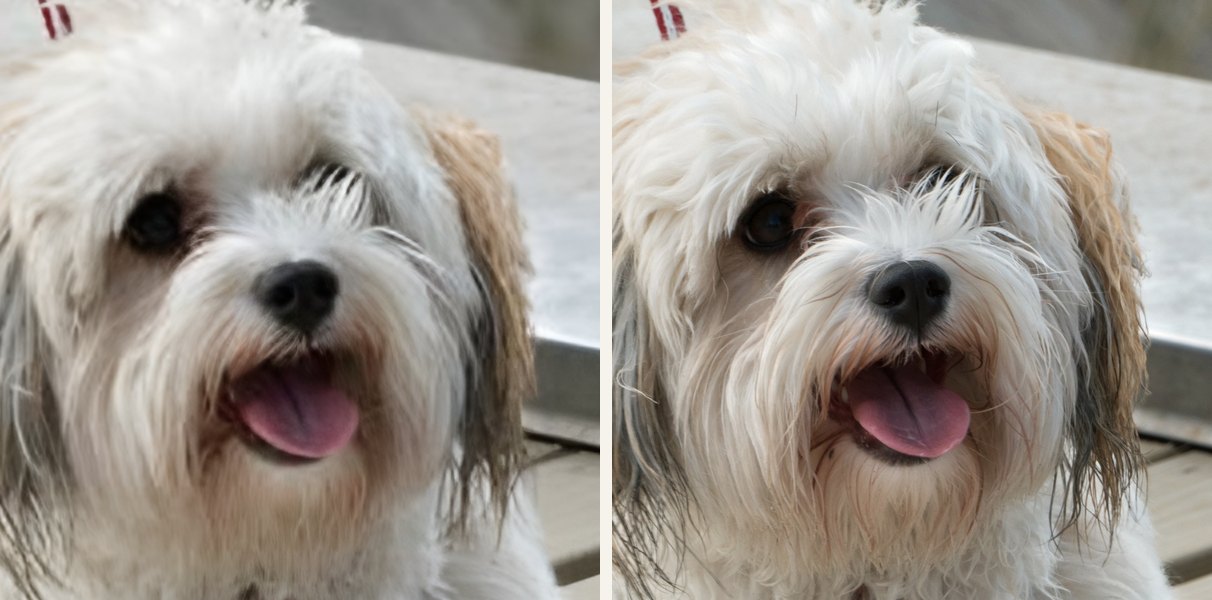
Bring back what the copy lost. An improved photo is sharper, not the original. Next to the original file the difference shows: the curls in the fur, which the copy reduced to a blur, come back as smooth strands. That is a good guess at fur, not the curls that were there.
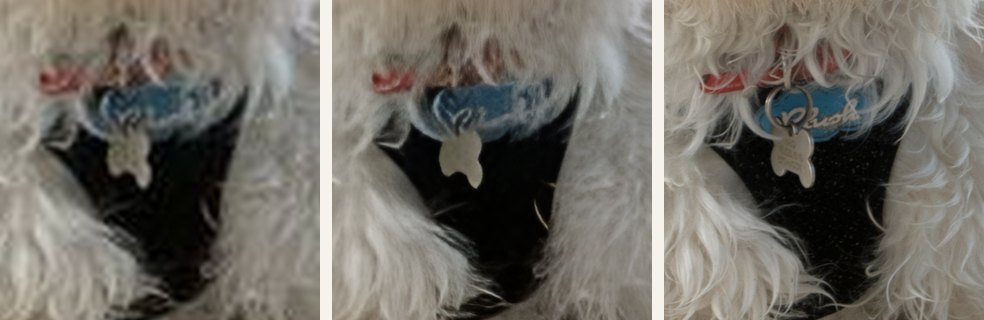
Read lettering. Writing too small to read in the copy stays unreadable, and a model that sharpens what it sees can turn a blurred word into crisp strokes that spell nothing. On the dog's name tag, the copy has a smudge, our AI draws cleaner strokes that spell nothing, and only the original shows the name. Signs, name tags and handwriting are worth a look in the before and after.
Sharpen a small face. Faces are where a model goes wrong first. Asked to sharpen a face only a few dozen pixels wide, it does not recover the person; it paints a likely one, with smoother skin and different eyes. So our AI never re-imagines a face. Small faces, like a group around a table, are enlarged the ordinary way, and medium ones get a lighter touch. It errs on the careful side: in the pictures above it took the dog's head for a face and gave it the lighter touch too. Nothing is added that was not in the photo.
Save a photo that is far too small. Below a certain size there is too little left to work with. A photo too small even for our AI is flagged in the editor, so you can swap it, move it to a smaller slot or find the original.
The original still wins
Every one of those limits disappears with the original file. When you can, ask for photos as files rather than as photos:
- In WhatsApp, have the photo sent as a document instead. It arrives with every pixel and the date it was taken.
- Between iPhones and Macs, AirDrop or an iCloud link moves the file itself.
- From Google Photos, a link to a photo kept in original quality does the same.
The HEIC and print quality article covers the other ways a photo loses pixels on the way to you, and the photo book from WhatsApp photos page shows how a book from a family chat comes together.
In short
- A chat copy looks fine on a phone and soft on a 30 cm page, because the page needs several times the pixels.
- Our AI improves those photos for print, free with every printed book, on our own servers.
- It never re-imagines a face and adds nothing that was not in the photo; you see the before and after and can keep the original.
- It cannot bring back what the copy lost. The original file is always best.
The photo of the dog is by W.carter, who gave it to the public domain (CC0) on Wikimedia Commons. Every image in this article is made from it as described: cut to a 400-pixel copy, then enlarged the ordinary way and by our AI, the same engine that improves the photos of a printed book, with nothing retouched afterwards. We never use a customer's photo to show what our AI does.
